
Manage Subscribers
Learn how to create, update, search, retrieve, and delete subscriber profiles using both the Dashboard and the API.
You can manage subscribers from the Novu Dashboard for manual operations or the Novu API for automated, large-scale management.
Create a subscriber
A subscriber must exist before notifications can be sent. Subscribers can be created in two ways:
Create subscribers via dashboard
You can create subscribers from the Novu dashboard and add user attributes or custom data for each subscriber.
To create a subscriber in the dashboard:
- Sign in to the Novu dashboard.
- Navigate to Subscribers page.
- Click Add subscriber or Create subscriber.
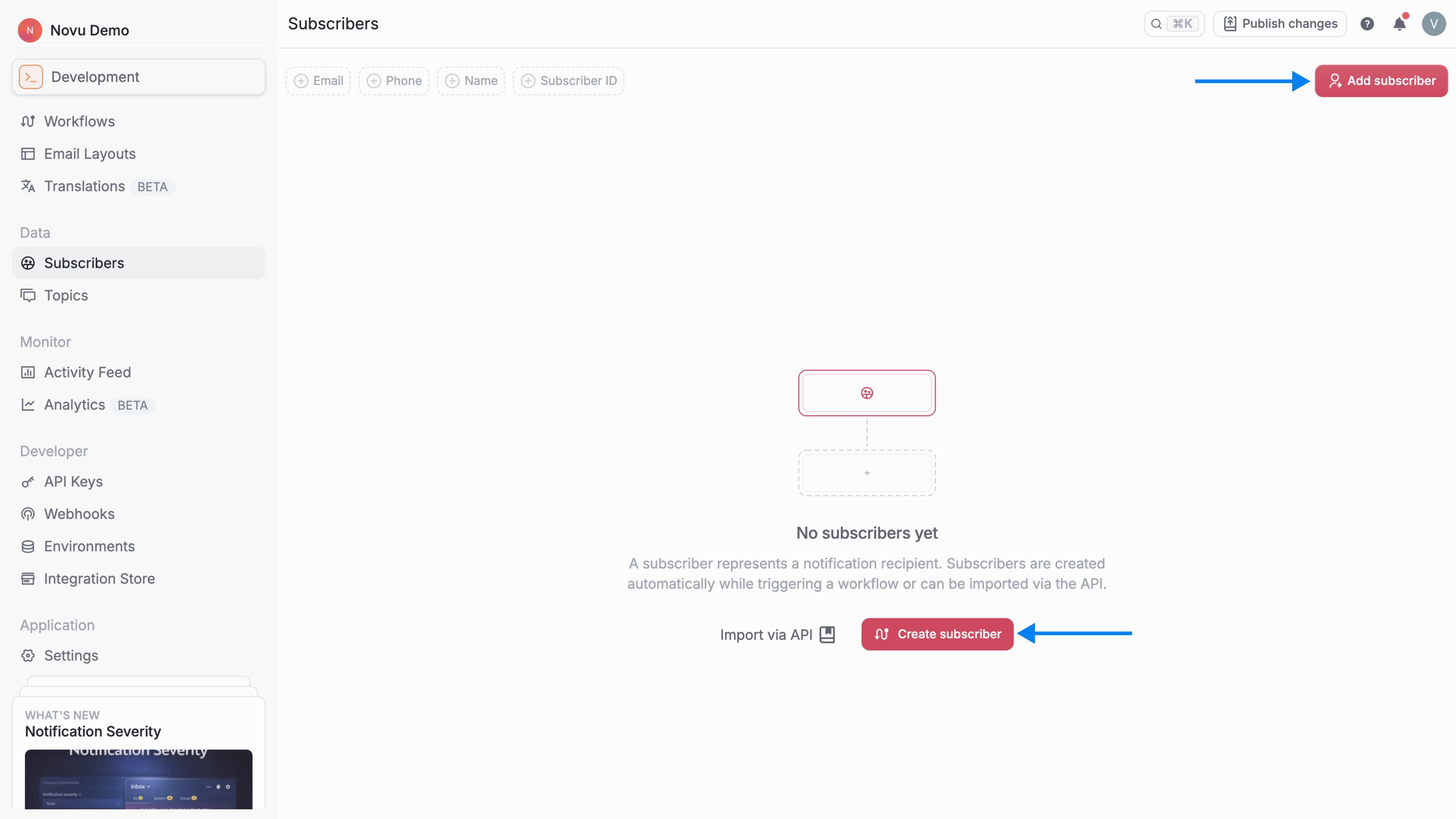
- Fill in the subscriber details such as
subscriberId(required), first name, last name, email, phone number, and locale.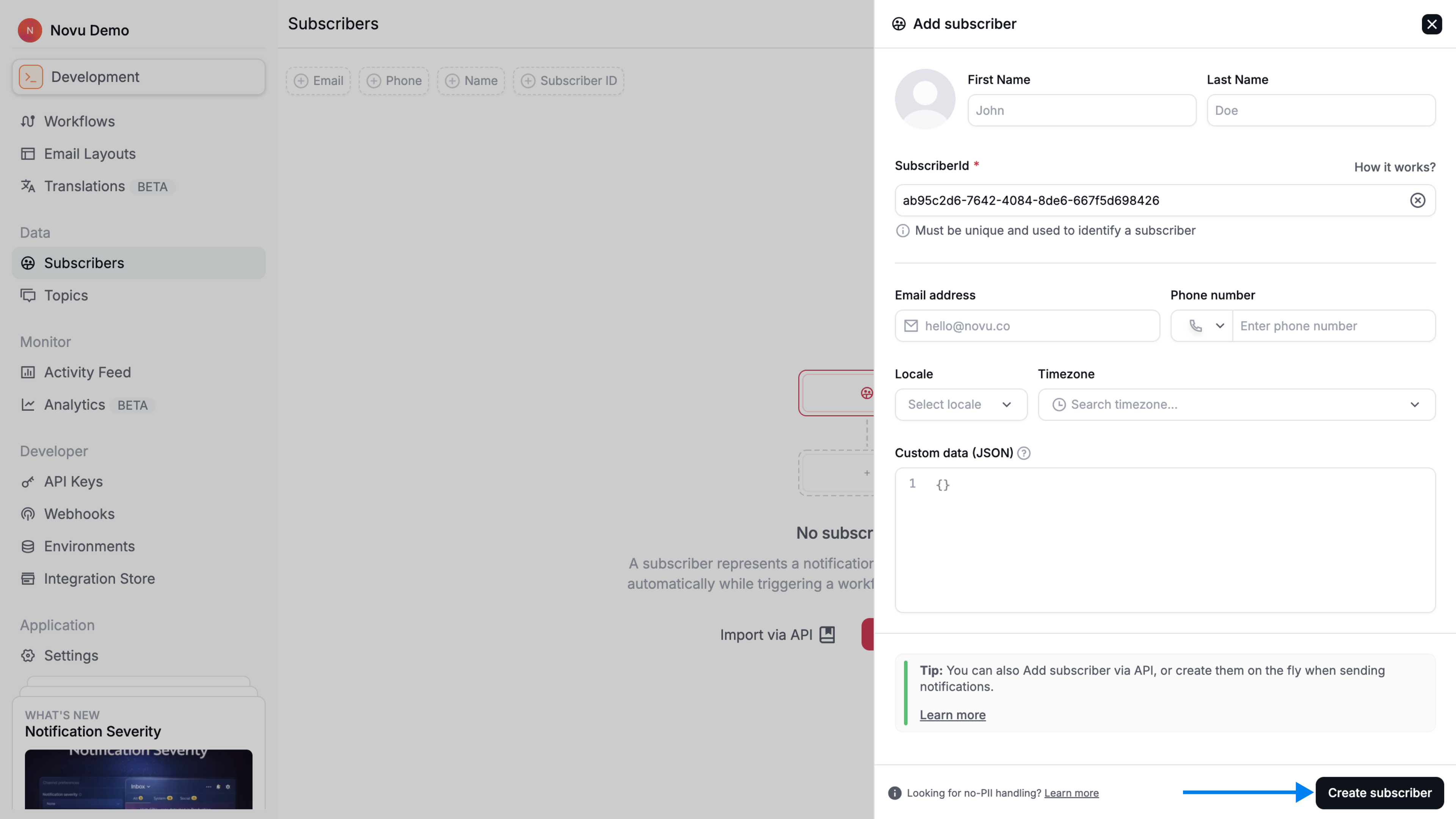 The
ThesubscriberIdcan only the edited during creation and cannot be updated aftwards - Click Create subscriber to save the subscriber profile.
Create subscribers via API
You can create subscribers with the Novu API in three ways and add user attributes, custom data, and channel credentials.
Create subscribers just in time
Novu allows you to create a subscriber automatically at the moment a notification is triggered. If the subscriber doesn't already exist, then Novu uses the information provided in the workflow trigger to create the subscriber on the fly. If the subscriber exists, then Novu updates the stored data with the latest values.
This approach is useful when:
- Your system does not store subscriber profiles ahead of time.
- Notifications are sent during real-time events like sign-ups or transactions.
- You want to keep the creation and delivery logic tightly coupled.
Create subscribers ahead of trigger
You can create and store subscriber profiles ahead of time, typically during onboarding, registration, or data sync events. This approach allows you to manage subscriber preferences, enrich profiles, and inspect delivery readiness before any notification is sent.
This approach is useful when:
- You want to decouple user creation from notification logic.
- You rely on persistent user data or prefer strict validation before delivery.
- You plan to use advanced segmentation or preference-based delivery.
Create subscribers in bulk
For scenarios like data migration, syncing large lists, or preloading subscribers, Novu supports bulk creation. This is especially useful when integrating with existing systems or importing subscriber data from external sources.
For more information about creating subscribers in bulk, refer to the API Reference documentation.
Update subscriber profile
You can manually update a subscriber's profile from the Novu Dashboard or via the API. This is important for keeping subscriber information, such as standard user attributes, custom data, or channel credentials up-to-date.
Update subscribers via dashboard
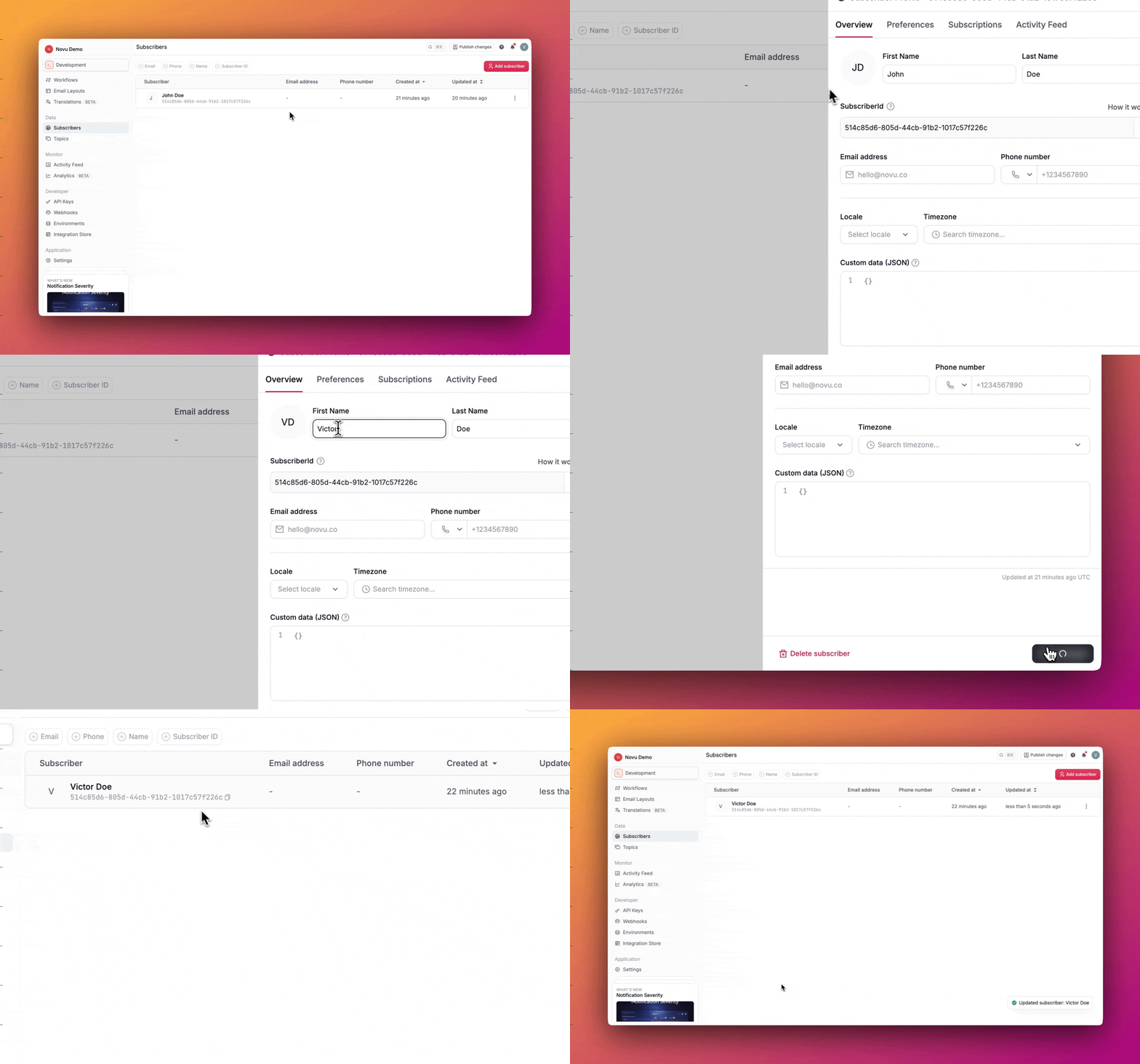
You can manually update a subscriber’s attributes and custom data from the Novu dashboard:
- Sign into the Novu dashboard.
- Open the Subscribers page.
- Select the subscriber profile you want to update.
- Edit structured attributes such as name, email, phone, or custom data.
- Click Save changes to apply the updates.
Update subscribers via API
The Novu API lets you update subscriber profiles programmatically, including user attributes, custom data, and channel credentials.
Update subscriber profile
To update a subscriber's basic profile attributes like firstName or email, or to modify their custom data object, use the subscribers.patch method. This method updates only the fields you specify, leaving others untouched.
Manage subscriber channel credentials
To deliver notifications to channels like push or chat, a subscriber's profile must contain the correct credentials (for example, deviceTokens or webhookUrl). Novu provides two methods to manage these credentials: update and append.
- The
updatemethod completely replaces the existing credentials for a given provider with the new data you provide. This is useful when you have a definitive, single source of truth for the credentials. - The
appendmethod adds new credentials or updates existing ones without removing others. This is particularly useful for push notifications where a single user may have multiple devices.
For more detailed information on request payloads and supported providers, refer to the Update and Upsert provider credentials endpoints in the API Reference documentation.
Search subscribers
Novu provides a way to search for subscribers, which is useful for troubleshooting, auditing user data, or verifying profile information. You can search for subscribers using either the Novu Dashboard or the API.
Search for subscribers via dashboard
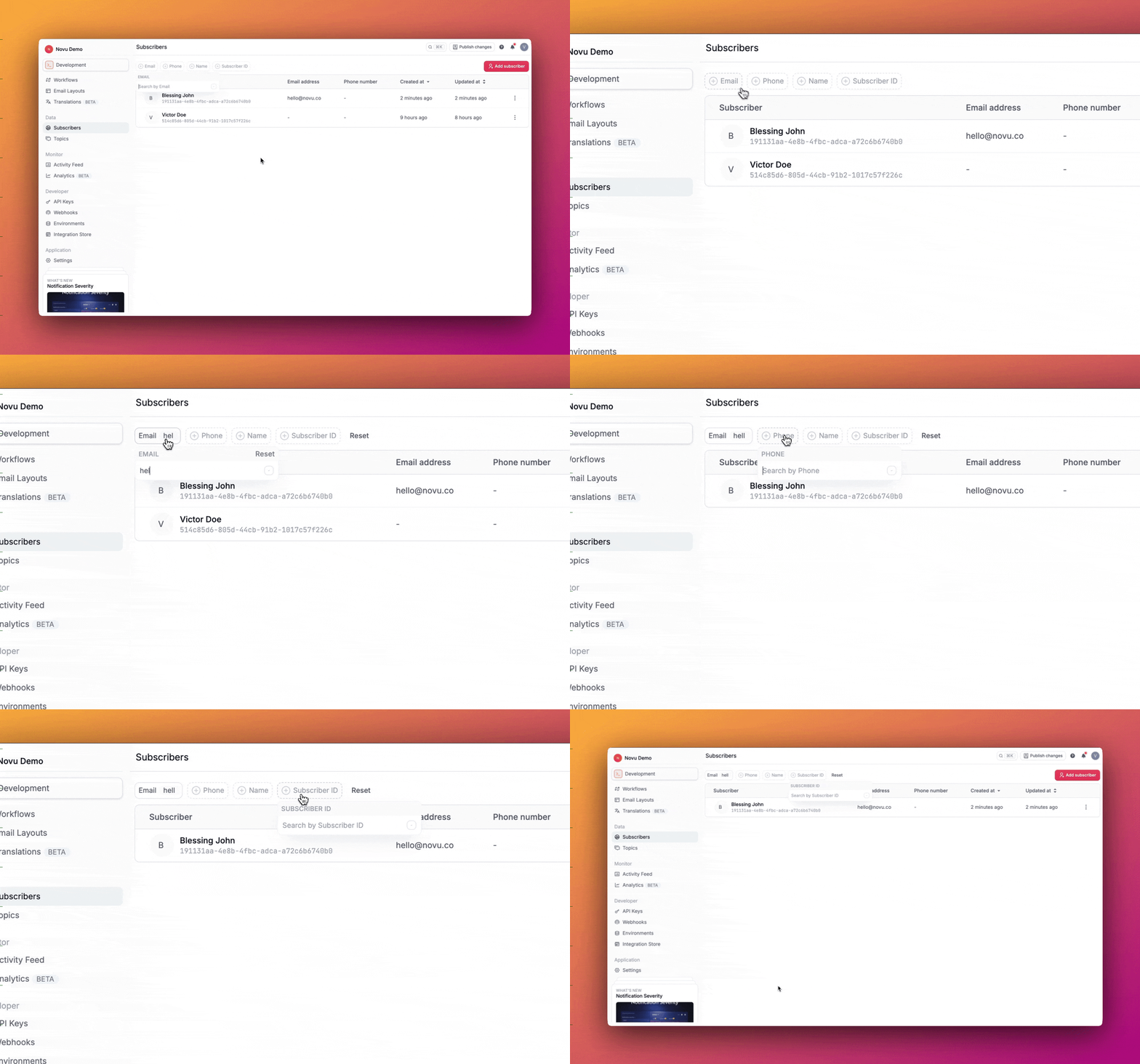
From the Subscribers page in the Novu Dashboard, you can search for a subscriber by Subscriber ID, Email, Phone, or Name.
Search for subscribers via API
You can use the Search Subscribers API to look up subscribers.
To learn more about searching for subscribers, refer to the Search Subscribers endpoint.
Retrieve a subscriber
You can fetch a complete subscriber profile using their unique subscriberId. This is done using the subscribers.get method. This method takes the subscriberId as a single parameter and returns a full JSON object containing all of the subscriber's stored information.
To learn more about retrieving a subscriber information, refer to the Subscribers API reference documentation.
Delete a subscriber
Deleting a subscriber permanently removes their profile and all associated data, including preferences, activity history, and credentials.
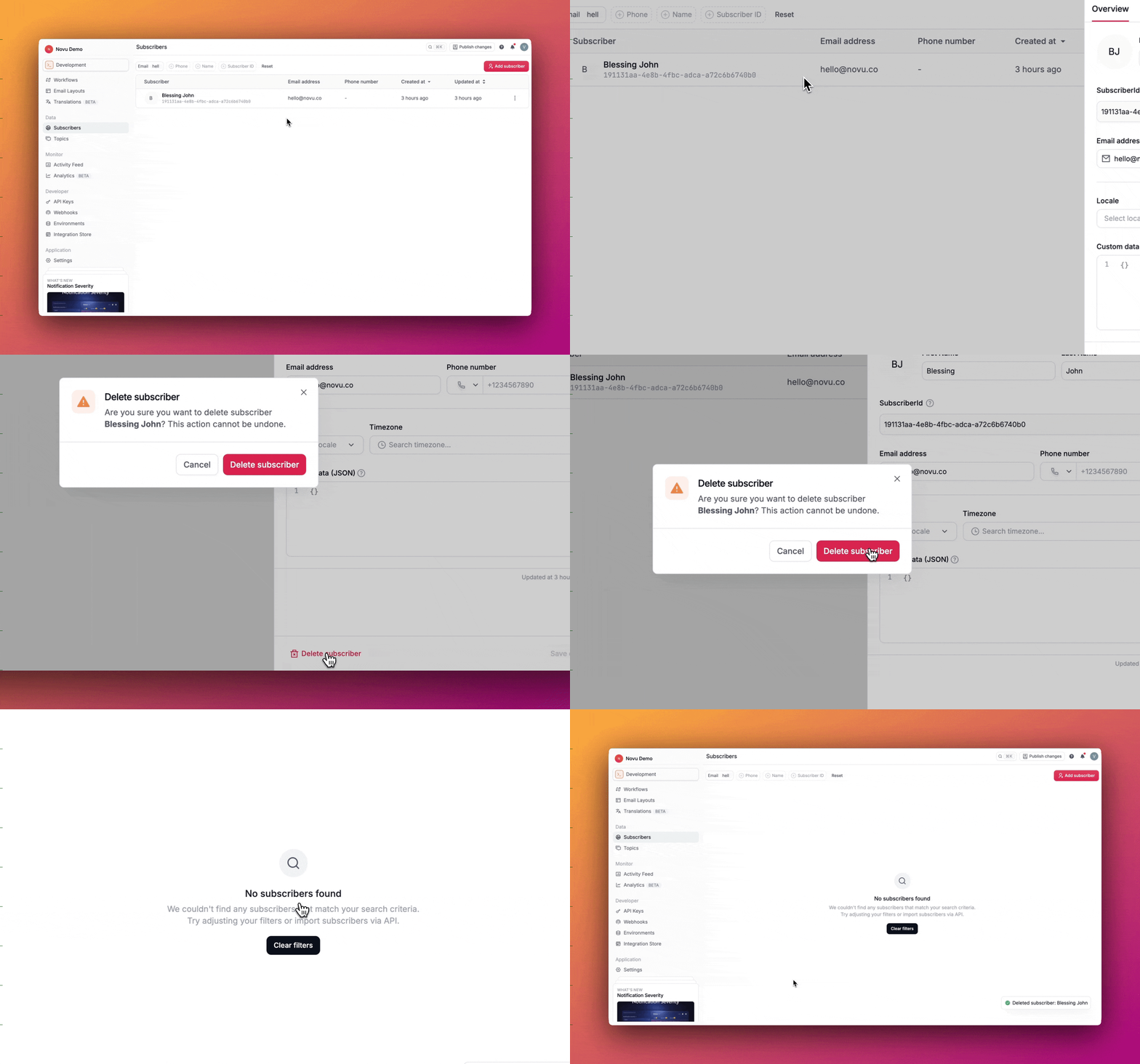
Delete a subscriber via dashboard
You can manually delete a subscriber’s from the Novu dashboard:
- Sign in to the Novu dashboard.
- Open the Subscribers page.
- Select the subscriber profile you want to update.
- Click Delete subscriber.
- Click Delete subscriber again to confirm.
Delete a subscriber via API
You can delete a subscriber using the subscribers.delete() method. The call deletes the subscriber record associated with the given subscriberId.
To learn more about deleting a subscriber information, refer to the Delete a Subscriber endpoint.